Portfolio
Signature with Pix
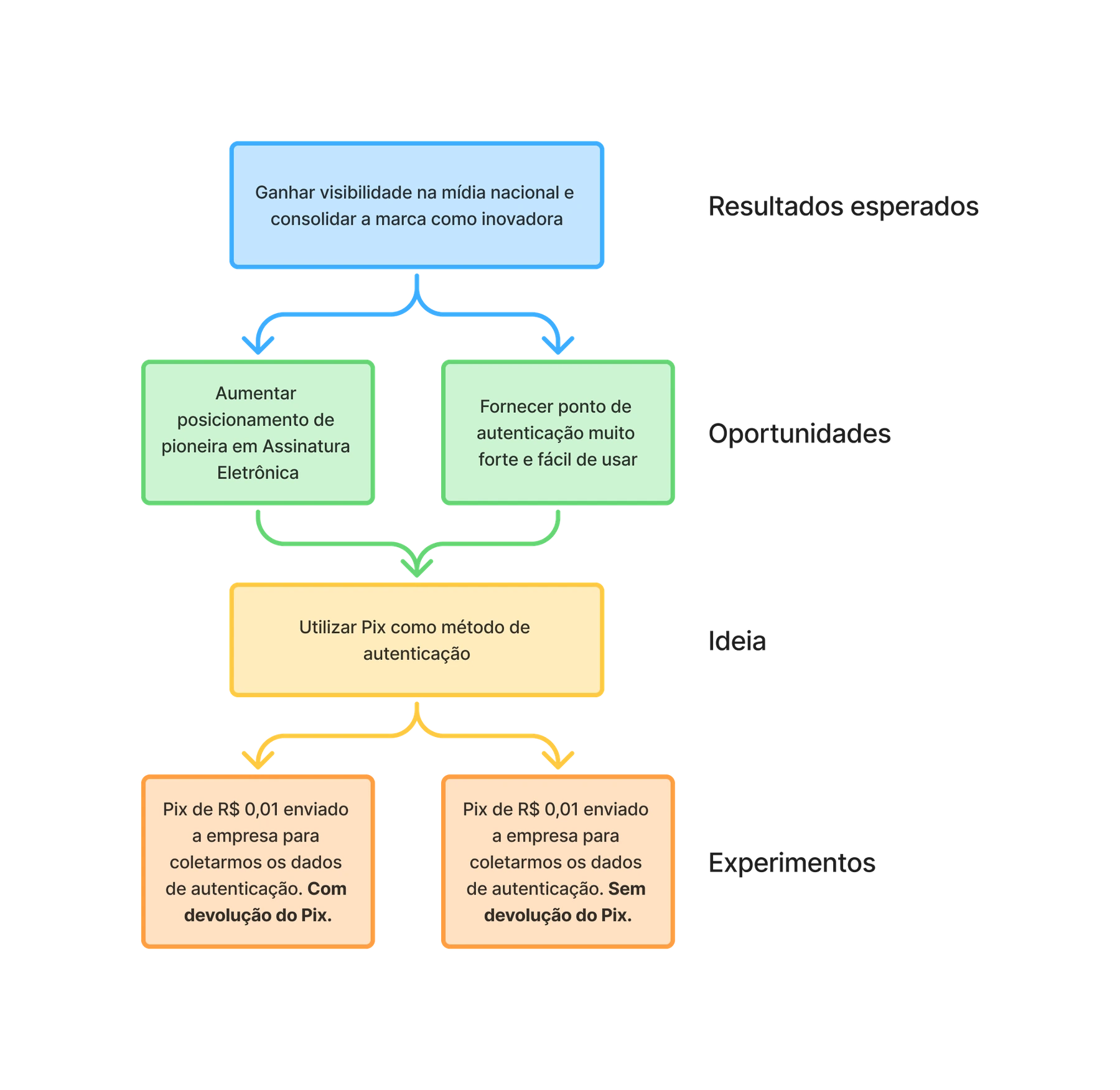
The company wanted visibility in national media and a stronger brand position as an innovative company.
- Discipline
- Product design
- Year
- 2021
- My role
- Product Designer
3,000+ signatures and a 95% success rate
Metrics
- Signatures with Pix
- 3,000+
- This result was weak compared with adoption, since it covered 5 months
- Success rate
- +95%
- The success rate of attempts to sign with Pix held steady, considering this solution adds more friction for the user.
- Social media impressions
- 6,000
- The goal of gaining visibility in national media and establishing the brand as innovative was relatively achieved
- Media appearances
- 28
- The story ran in several major outlets, such as Valor Econômico, G1 and Exame.
The Challenge
How can we create an innovative and secure authentication method for B2B users, using Pix technology to position the company as a leader in innovation in the legal market?
Business Context
In 2021, with the fast adoption of Pix, Brazil's instant payment system, the company saw a double strategic opportunity: build a differentiated technology solution and gain national visibility as an innovative company in the legal sector.
- Goal: be the first to launch signatures via Pix
- Deadline: 2 months to develop and deliver
- Business goal: consolidate the position of an innovative brand
Process
To be the first to launch signatures via Pix, the team had only two months to develop and deliver the solution. Applying the Lean UX method, we formed hypotheses and set up experiments to validate them.
Technical and business discovery
As Product Designer, I supported the Product Manager, who led the technical mapping of how Pix works and the study of the business model for this new offer.
User research
I led the research process with support from the Content Designer.
Ideation
Collaborative work in which I acted as Product Designer, together with the Product Manager, Content Designer and Tech Lead.
Prototyping
I worked as Product Designer on the interfaces and prototypes, with support from the Content Designer.
Testing
I ran the recruiting process, the research planning and the usability tests, with support from the Content Designer.
Analysis and iteration
I did the analysis and synthesis of the test results together with the Content Designer.
Handoff
I wrote the delivery documentation for the developers.
Results analysis
The Product Manager ran the analysis of the results after the product was made available to users, and I supported the documentation and consolidation of the findings.
Discovery
We interviewed internal stakeholders and, with the data collected, worked on an opportunity tree. At the time, we identified only two possible experiments.
Desk research
We gathered data on the technology and on how Pix is used in Brazil.
"Pix chega a 25% dos brasileiros, movimenta R$ 203 billion" [Pix reaches 25% of Brazilians and moves R$ 203 billion]
"... Já são 735 instituições aprovadas como participantes do Pix..." [Already 735 institutions approved as Pix participants]
Source: Exame
"Pix tem 100 million de chaves registradas" [Pix has 100 million registered keys]
"O Pix é gratuito para pessoas físicas nas operações de transferência e de compra. [...] pode ter até cinco chaves" [Pix is free for individuals for transfers and purchases. [...] can have up to five keys]
Source: Agência Brasil
"Pix tem quase 4.4 million de portabilidade de chaves" [Pix has almost 4.4 million key portability requests]
"É um movimento natural do início de operação do Pix onde várias pessoas cadastraram a sua chave..." [It is a natural movement at the start of Pix operations, when many people registered their key...]
What is Pix?
"O Pix é a solução de pagamento instantâneo, criada e gerida pelo Banco Central do Brasil (BC), que proporciona a realização de transferências e de pagamentos." [Pix is the instant payment solution, created and managed by the Central Bank of Brazil (BC), which enables transfers and payments.]
Source: Banco Central do Brasil
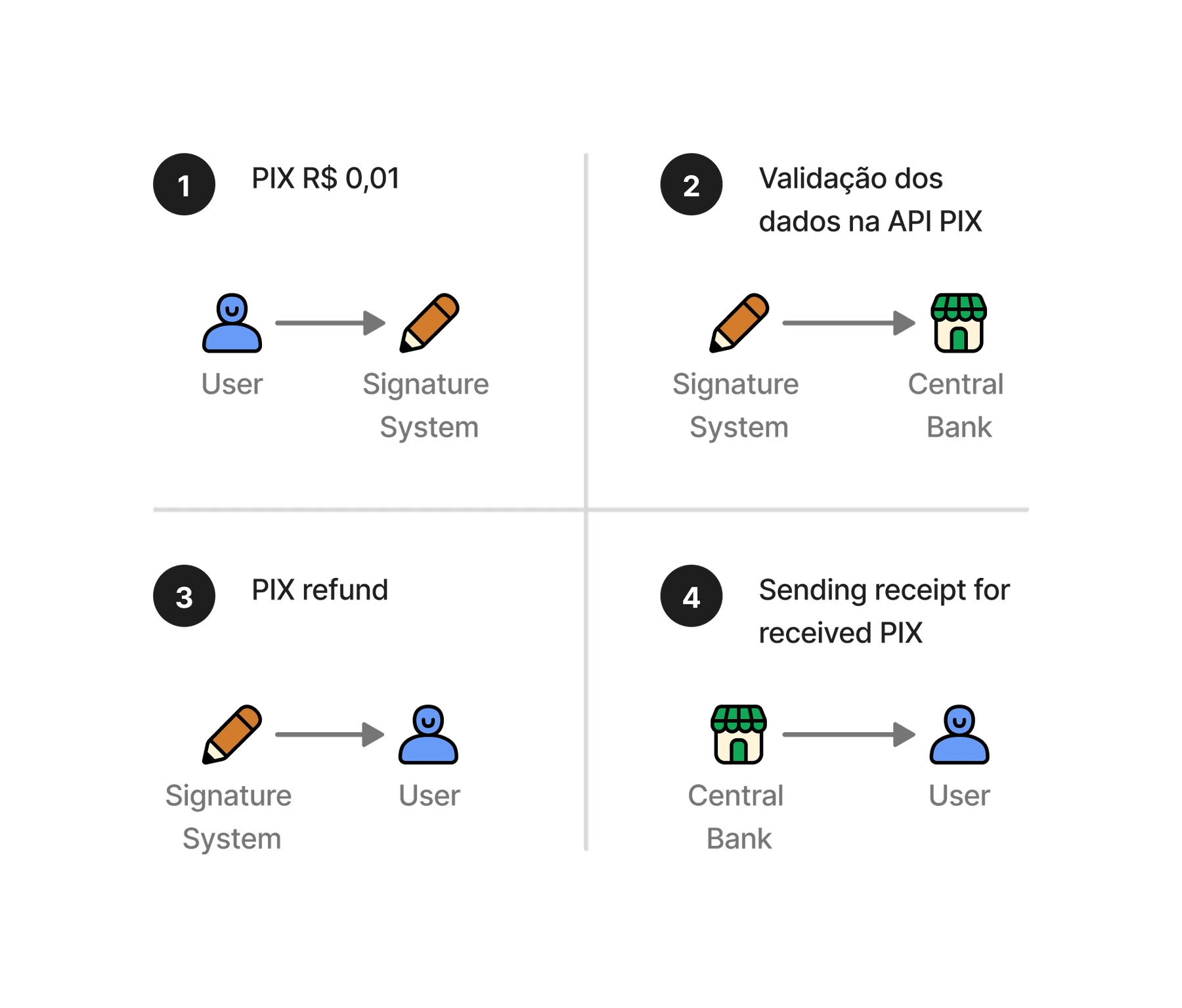
The Product Manager ran an analysis to understand how the signature system would work with Pix, based on a transaction with the Central Bank. This was important for understanding what the user experience would be.
Research
We needed to understand more about Pix and about users' needs for strong authentication in signatures. To do that, we defined some research methods:
- Exploratory interviews, to understand whether there are problems related to authentication and how Pix works
- Benchmark, to understand bank transaction patterns
- Usability test, to assess the risk of acceptance and use
- Post-test interview, to assess people's perception of the solution
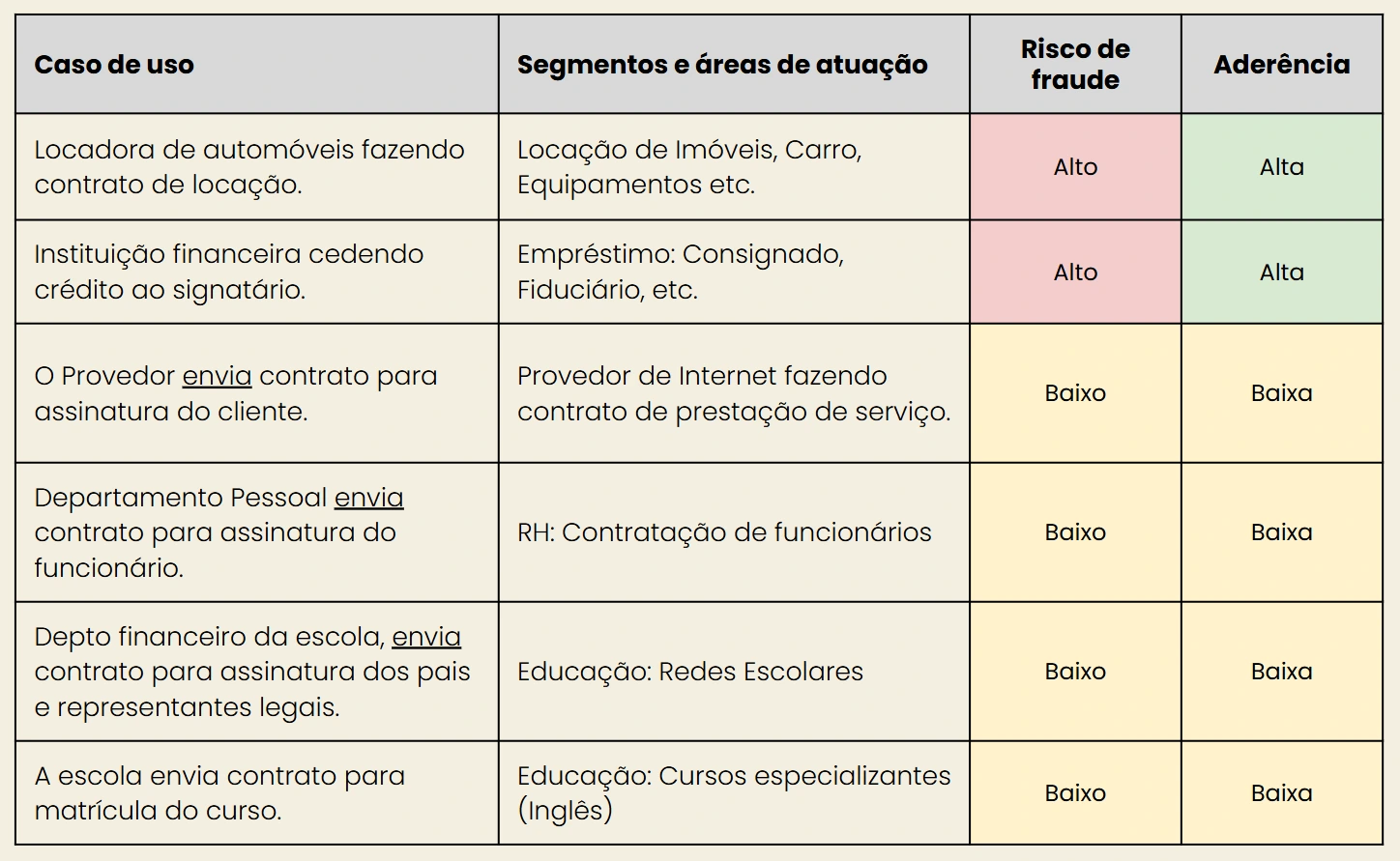
We found that users who felt the need for stronger authentication had businesses with a high fraud risk. So these customers could show more adherence to signing with Pix.
We interviewed 22 customers.
I analyzed how Pix is used across several banks, and we learned some important points that should be considered in the design:
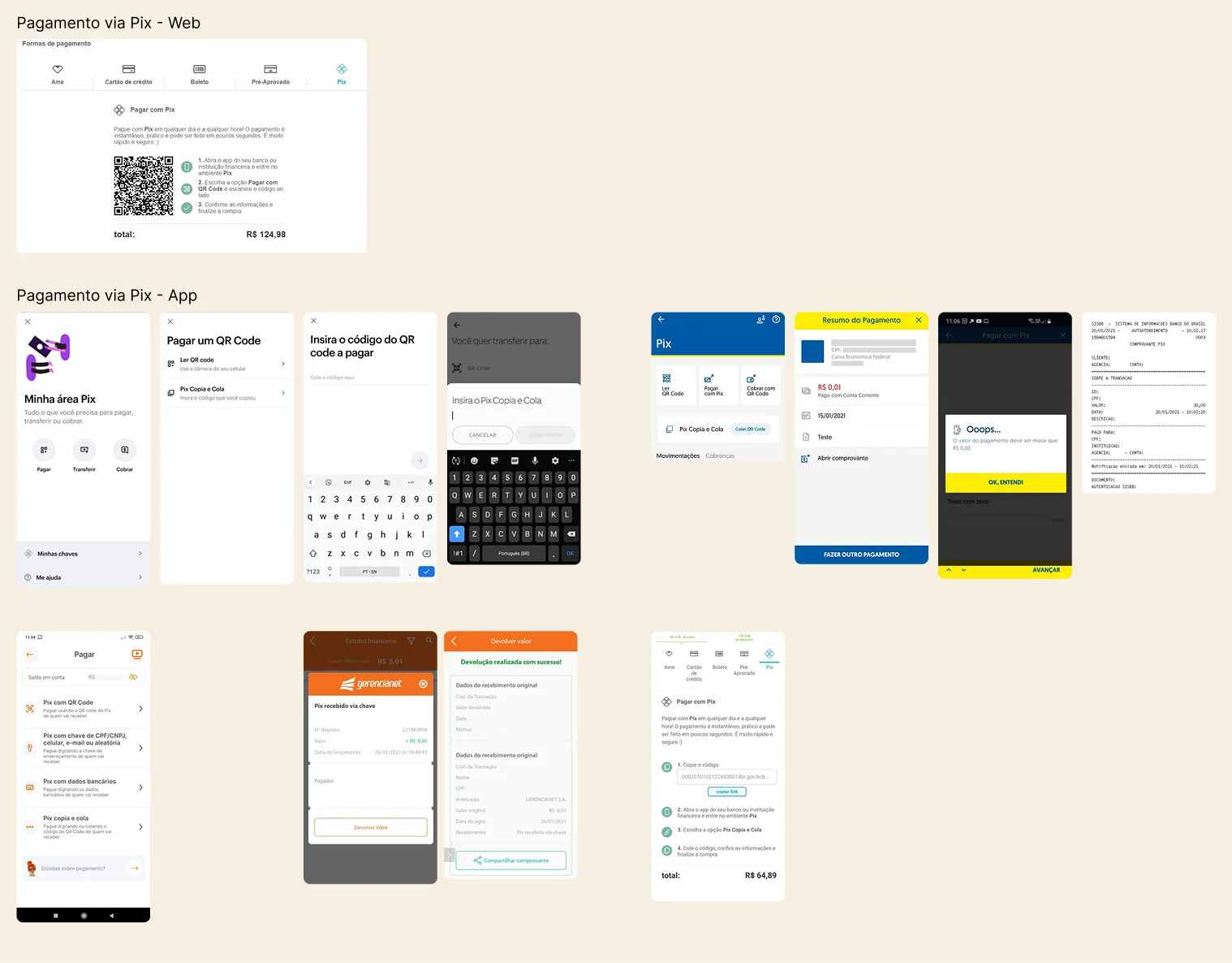
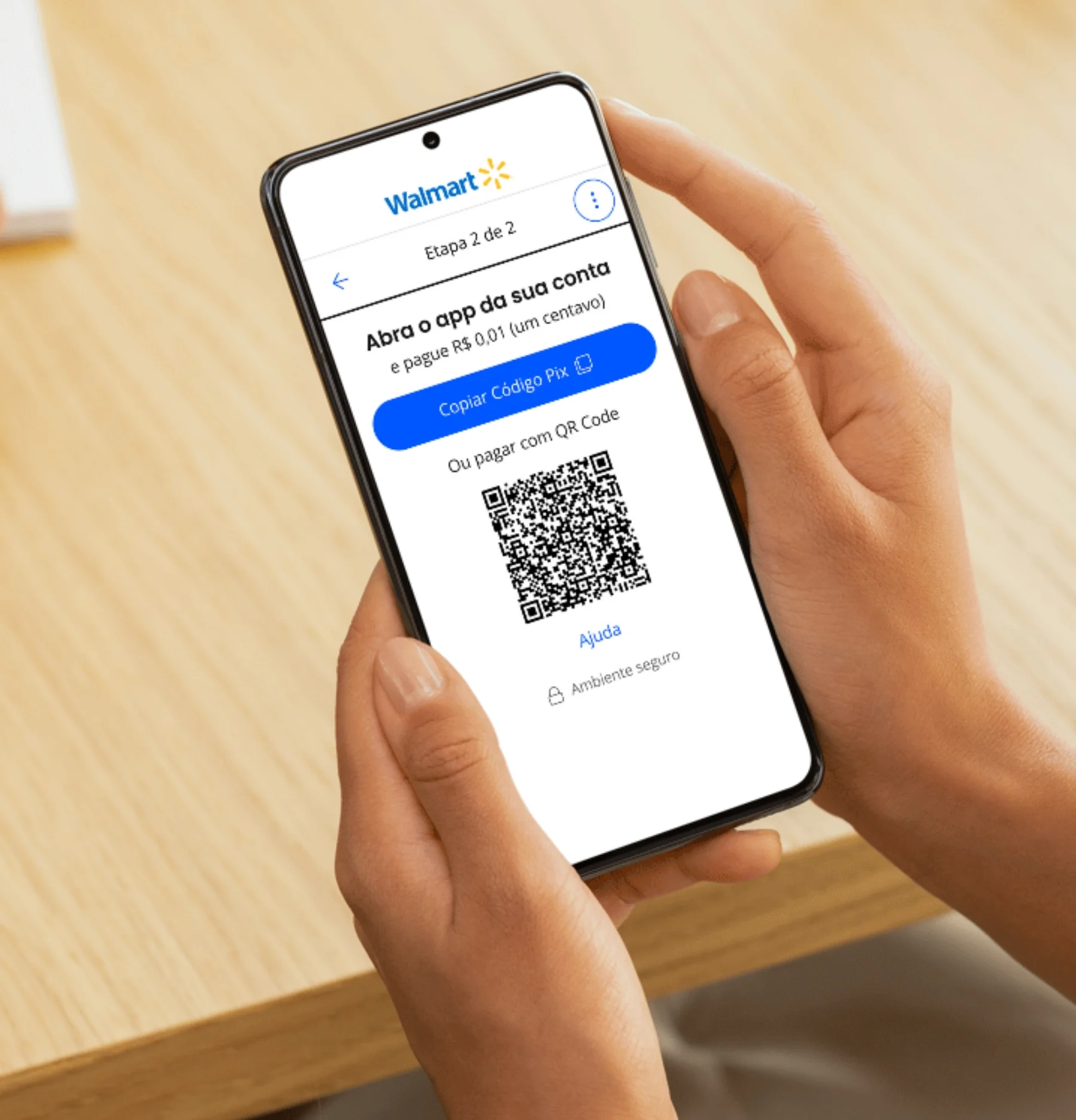
- The QR Code could be unfeasible on mobile
- Pix Copia e Cola was simpler on mobile
- Using the QR Code on desktop together with the smartphone app was simple
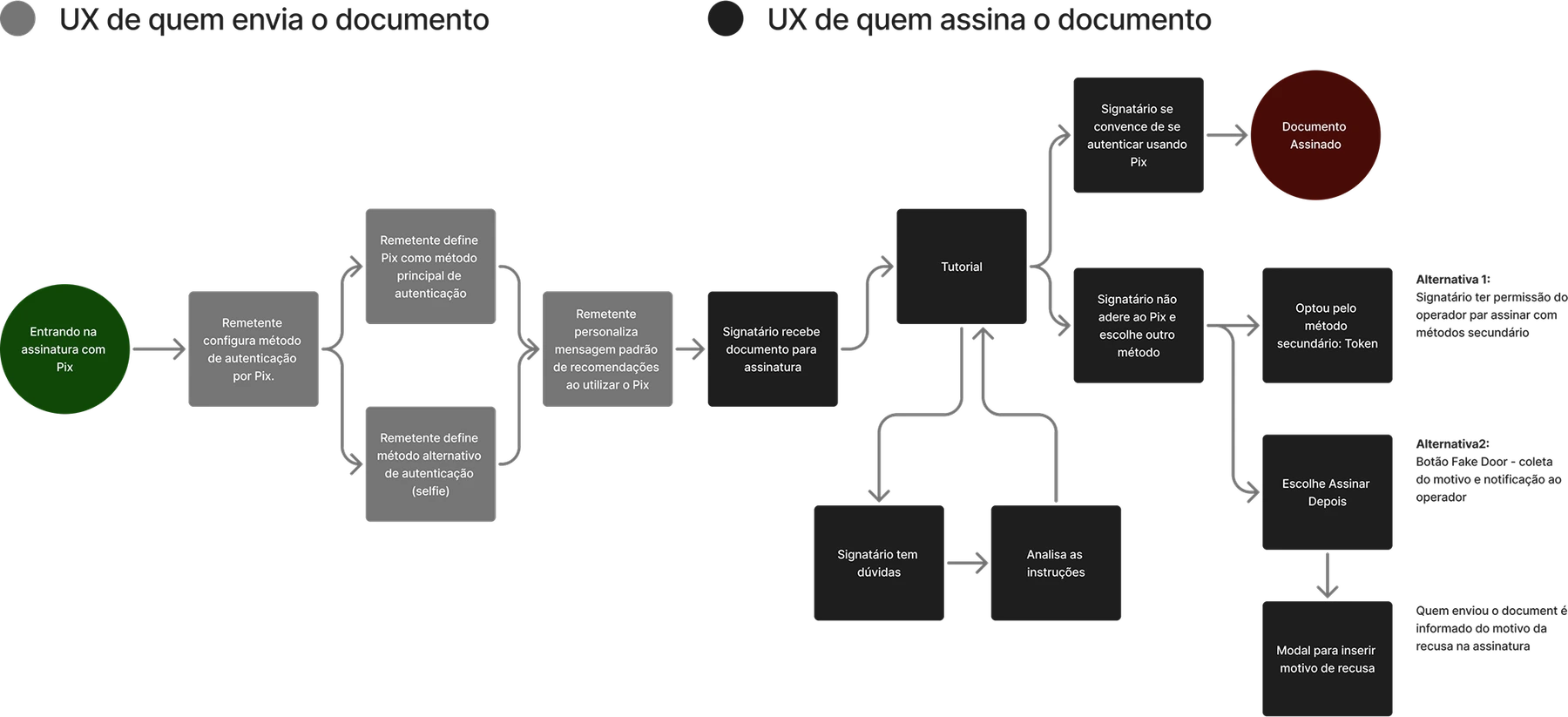
I drew several flows for how the user journey would work, and aligned many times with the Product Manager, Content Designer and Tech Lead until we reached the final flow, which was validated by stakeholders.
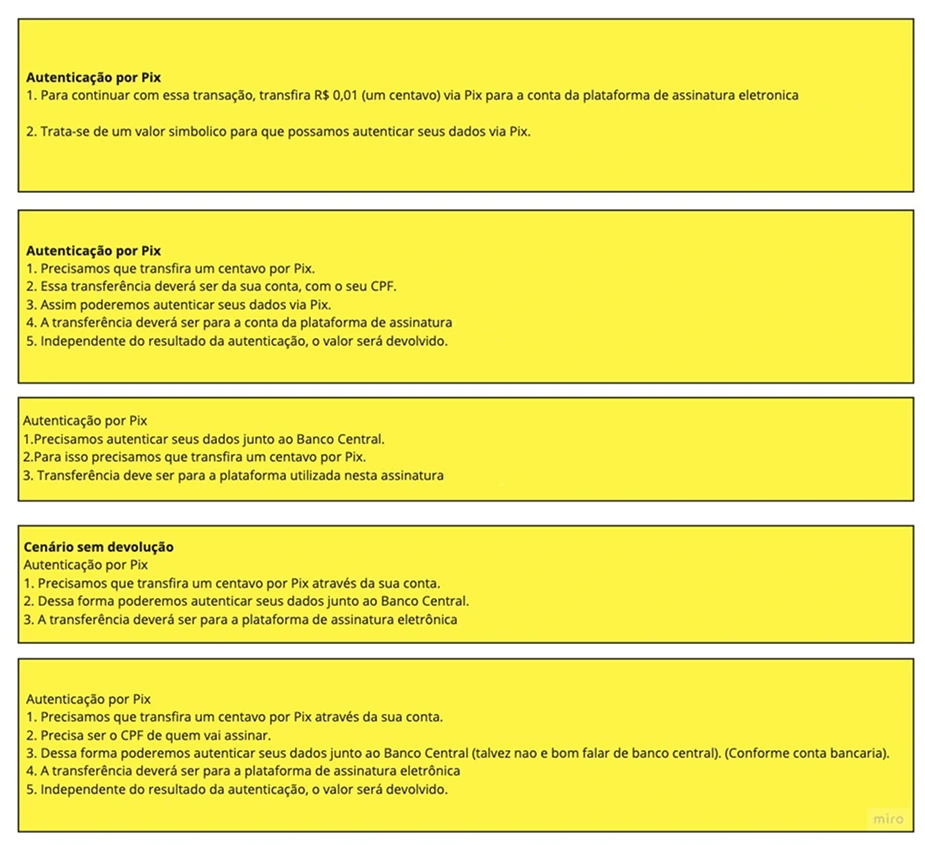
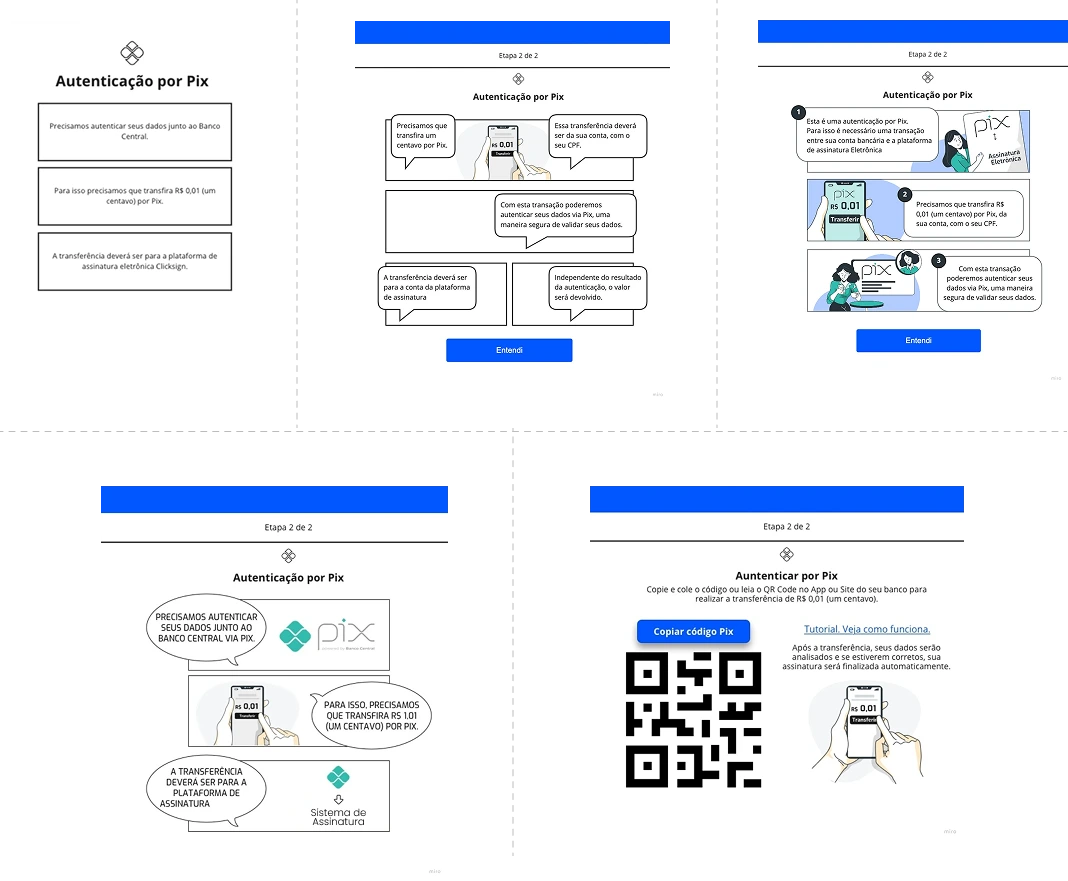
Experience narratives
The Content Designer worked on narratives to explore how to make the Pix signature experience more natural and easier to understand. I supported her in building these narratives, and they were important for building the wireframes.
Wireframes
I drew several versions of screen flows in low fidelity to explore ideas quickly, and aligned many times with the Product Manager, Content Designer and Tech Lead until we reached the final flow, which was validated by stakeholders.
As Product Designer, I built the user interface and essential prototypes to evaluate users' perceptions. The visual concept was aligned with the company's Design System and its guidelines.
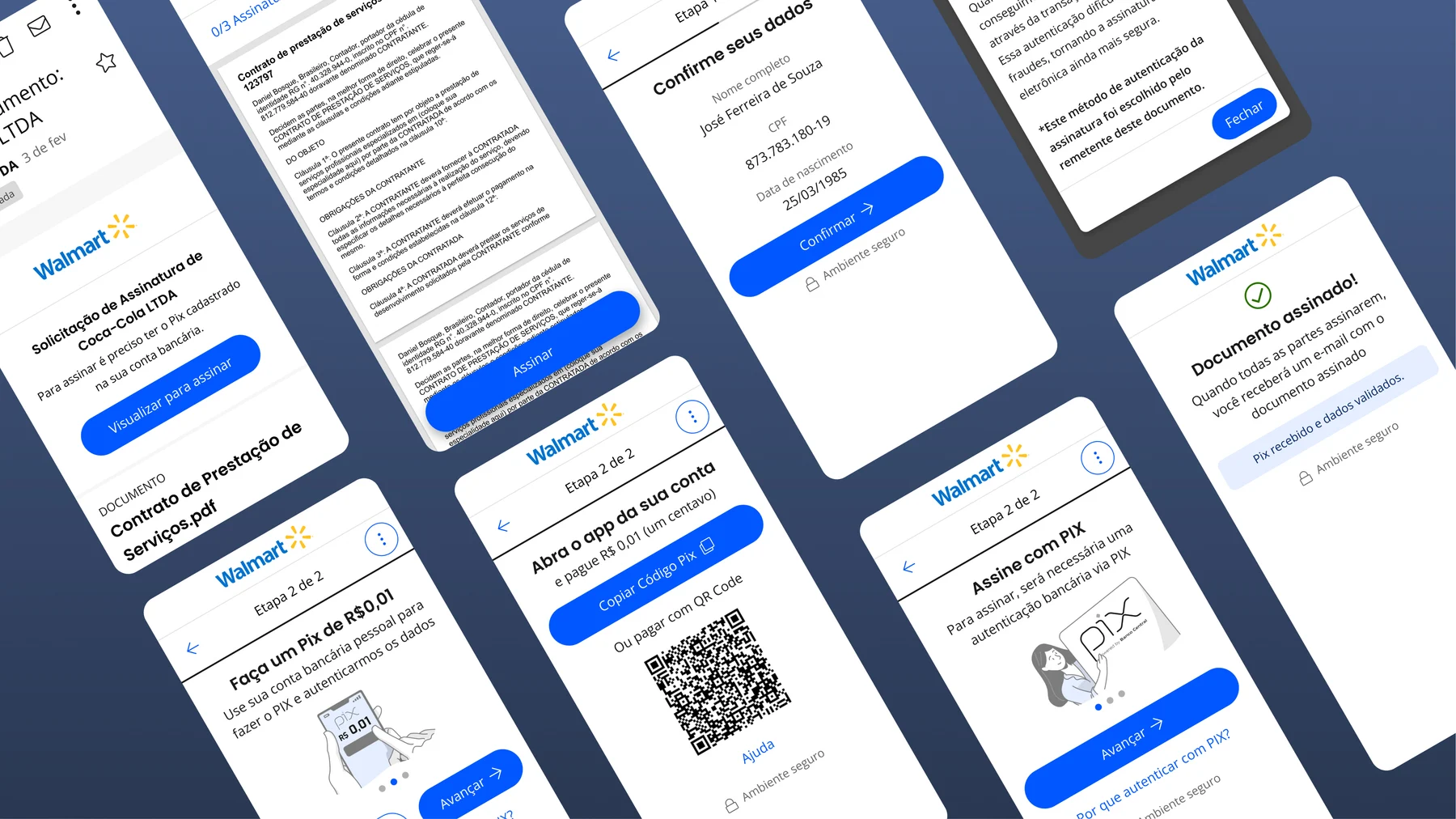
Signature with Pix, with the security of the Central Bank
The Interface
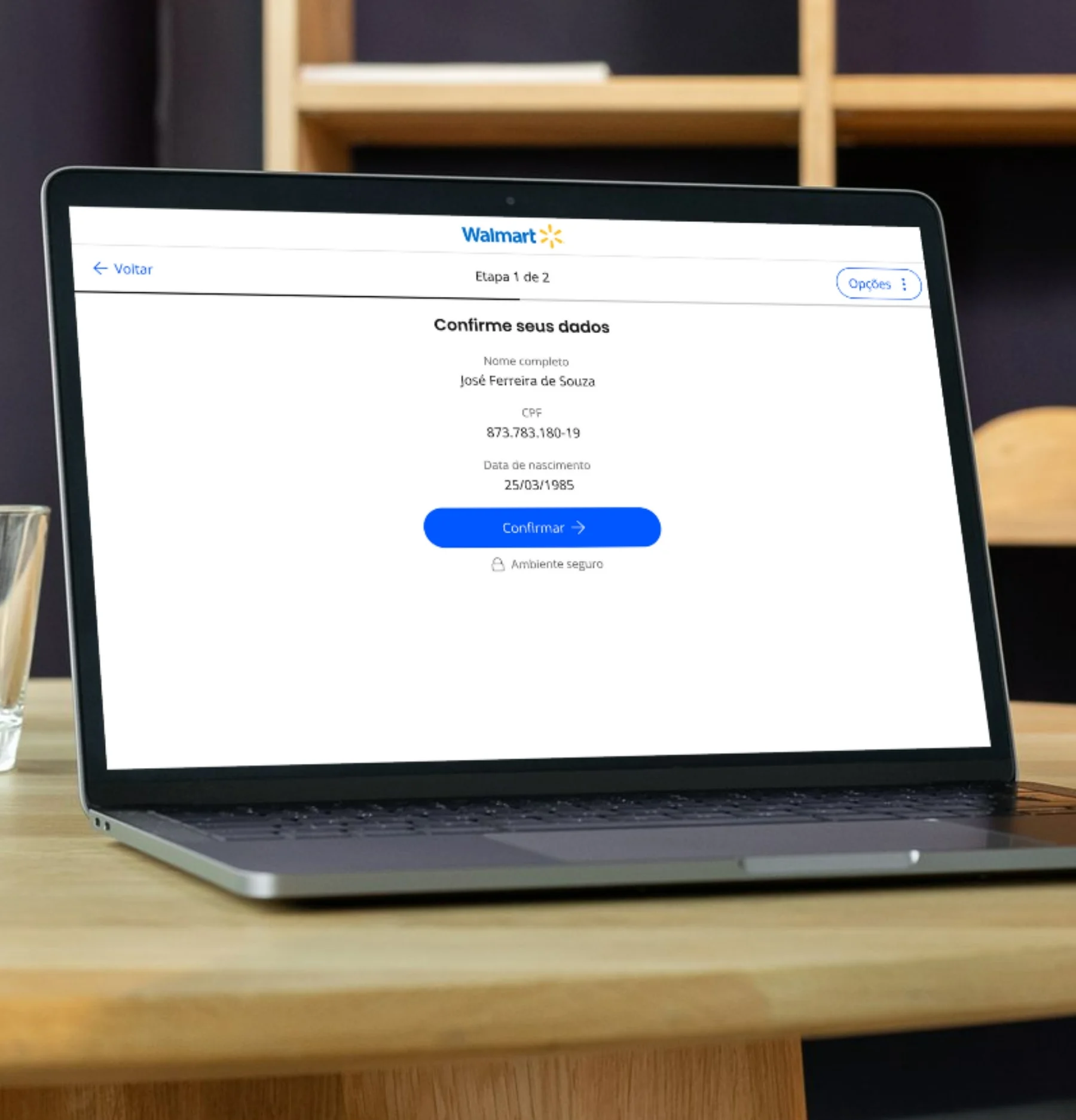
Our main challenge was creating a reliable signature flow. During the tests, some users found it strange to receive a document to sign and then make a Pix payment. We also had to present information simply and briefly, because in the usability tests we found that most people did not read long texts. Even so, it was essential to make the key points clear so that authentication would work correctly.
Usability tests
To assess the risk of acceptance and usability, we built prototypes for testing. We ran 21 tests with people inside the company and some customers. After each test, we conducted interviews. This research was carried out by me and the Content Designer.
In this stage of the project, I drafted the research plan. With the help of the Product Manager, we recruited users and ran the tests, where I moderated while the Content Designer took notes.
Challenges
- Several interviews were held with people from other areas of the company who were not involved in developing the products. However, we would have liked to test with more users and non-users of the system.
- We had to simulate a scenario as close to real as possible, since we needed to assess acceptance and understanding
- The Pix payment step required two people to simulate sending the Pix key in real time during the test
- We could not bias users with too much context
Analysis
We built a spreadsheet with each screen the user had to go through, and noted positive points, negative points and observations about their interaction, and tried to identify their emotions during the journey.
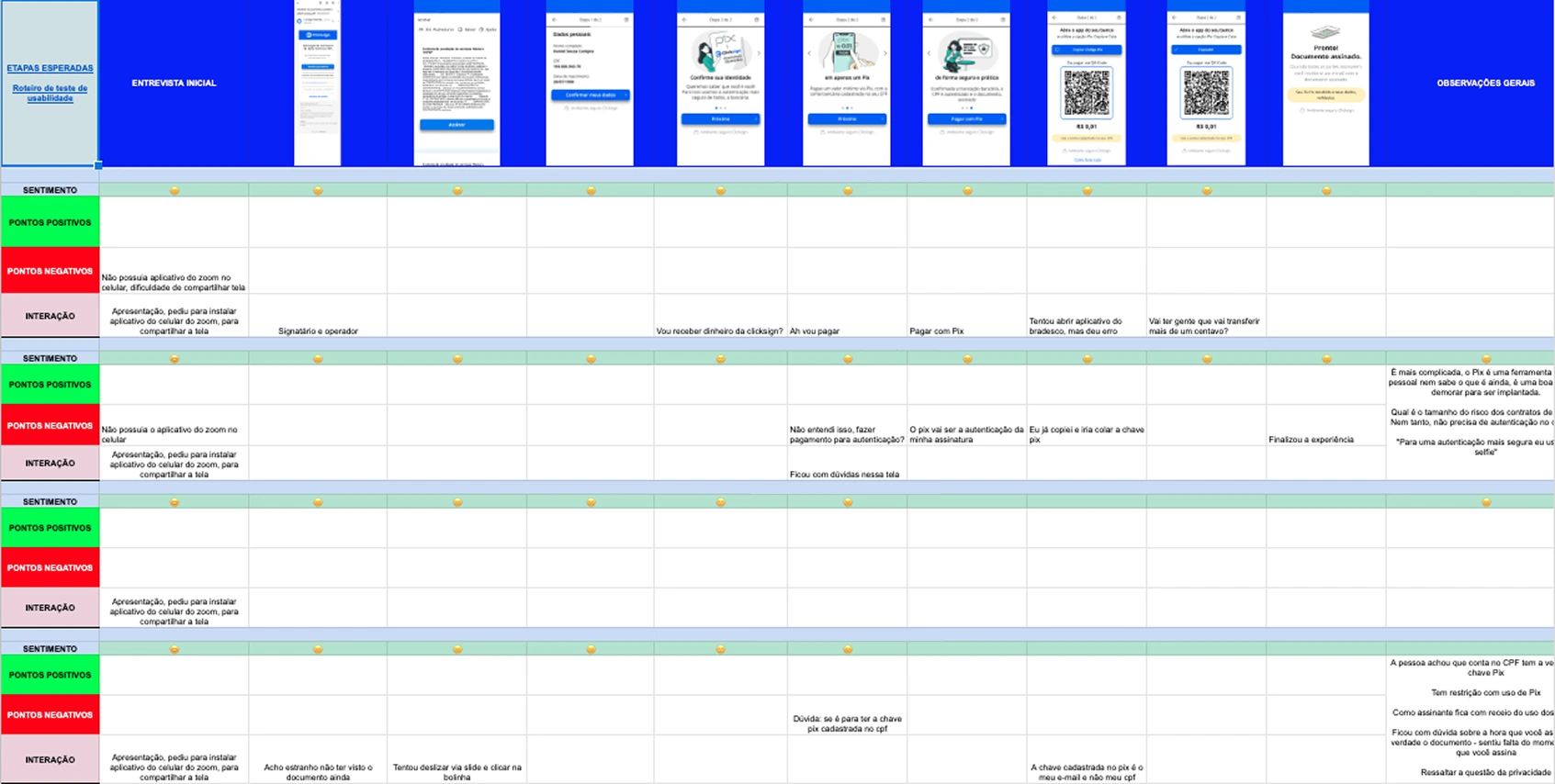
Research learnings
We believe that, with the resources we had, we reached a fluid and simple experience for a first version.
During the testing period we changed the prototype several times to evaluate what worked best in the interface, keeping a cycle of evaluation and adjustments. We stopped iterating when the results started to repeat.
Verbal explanations should be enough for a quick understanding, but with care not to create more doubts or show long texts, because the reading rate could drop.
Finishing the process became faster and easier for users to understand with each iteration.
The mobile version should favor Pix Copia e Cola, and the desktop version the QR Code.
It was essential to give the user context about why a Pix payment would be requested.
We would need to create documentation to make the sender of the document understand how important it is to warn the recipient in advance that a symbolic payment would be requested to complete the signature.
Understanding the payment during the process could create doubts and insecurity, even if the operation was easy to carry out.
Team learnings
We reached the company's goal of gaining visibility in national media and establishing the brand as innovative, but we do not consider that we reached all the user goals. After further evaluations we understood that customers needed stronger authentication for certain operations, but Pix was not legally accepted for that, and signing with a Digital Certificate was required, which we were not addressing at that time.
The usability tests were essential for the success rate of the process to be high.
We learned to test fast, evaluate results, make adjustments and test again.
Design was a powerful tool for the success of the solution's use.
Content design was fundamental for giving users more security.
We would need to offer alternatives in case the user did not want or could not use Pix.
We would need to improve the experience of the document sender to prevent risks when using Pix authentication.